Product

The platform underneath Trend, Signal, Steer.

Portfolio and Period Reports are how most multi‑entity teams experience Coherence every day. Underneath both is a full accounting and operations platform — ready for any entity that wants to run natively on Coherence, with the depth a serious finance team actually needs.

The two steering surfaces

How most teams experience Coherence every day.

One surface for the numbers that run the business. One surface for the reports the team already produces. Both trend from day one, both signal what needs attention, both put you one click from the source.

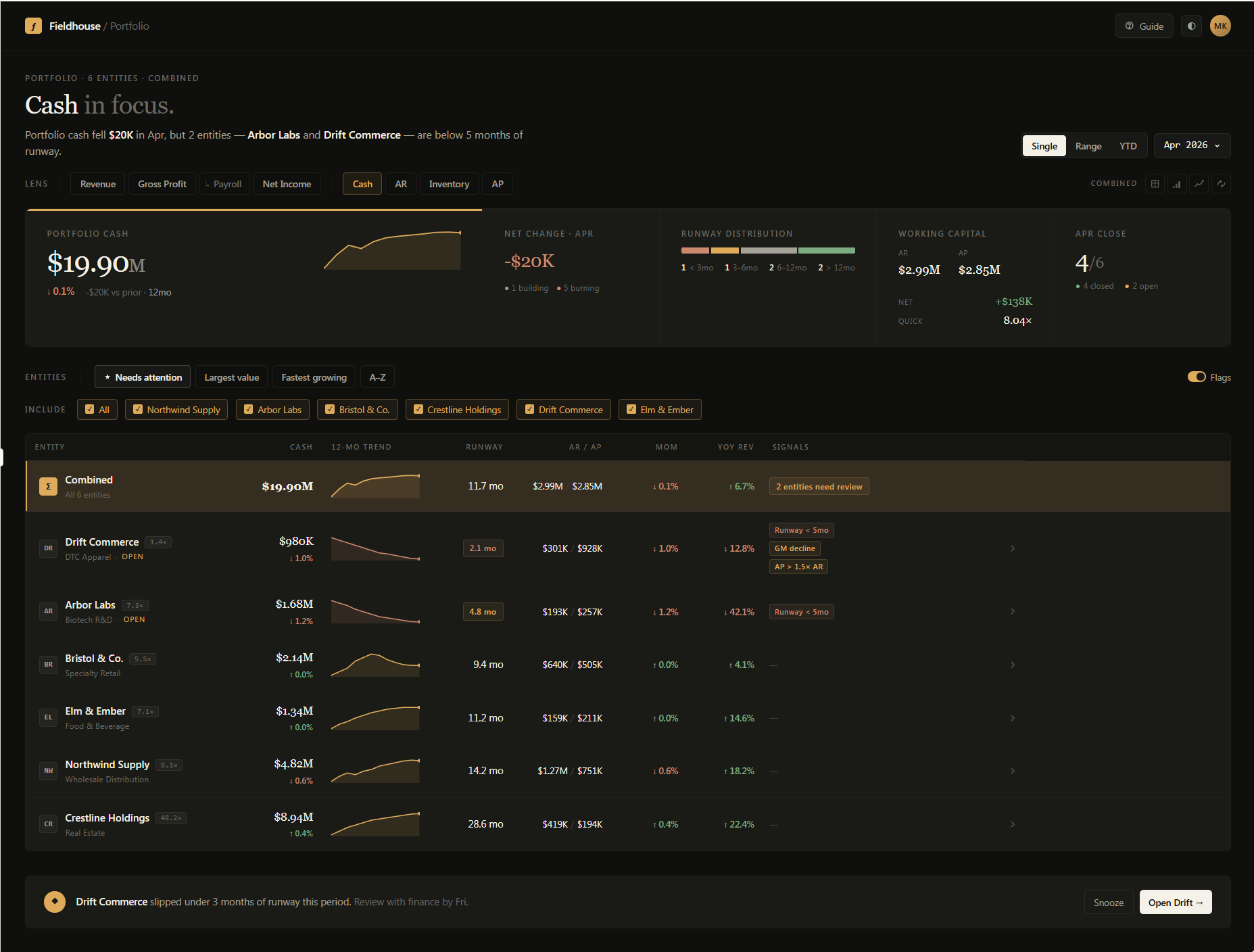
● Portfolio Portfolio dashboard with Cash lens active — entity table with signal chips on Drift Commerce and Arbor Labs
The financial steering surface

Portfolio — every company, one screen.

Nine metrics trending. Signal chips that surface what needs attention. A drill path from portfolio view to individual transaction in one session. Works the same for one company or a hundred.

i. Trend

Revenue, gross profit, net income, cash, AR, AP, inventory, on‑time delivery, quote pipeline — every metric, every entity, with 12‑month sparklines and MoM / YoY deltas side by side.

ii. Signal

Signal chips flag low runway, slow collections, tight liquidity, margin compression — on the row, next to the number. You see which entity, which metric, which period.

iii. Steer

One click from portfolio to dashboard, dashboard to statement, statement to transaction. Seeing and acting in one session — no exports, no logins between surfaces.

Capabilities below
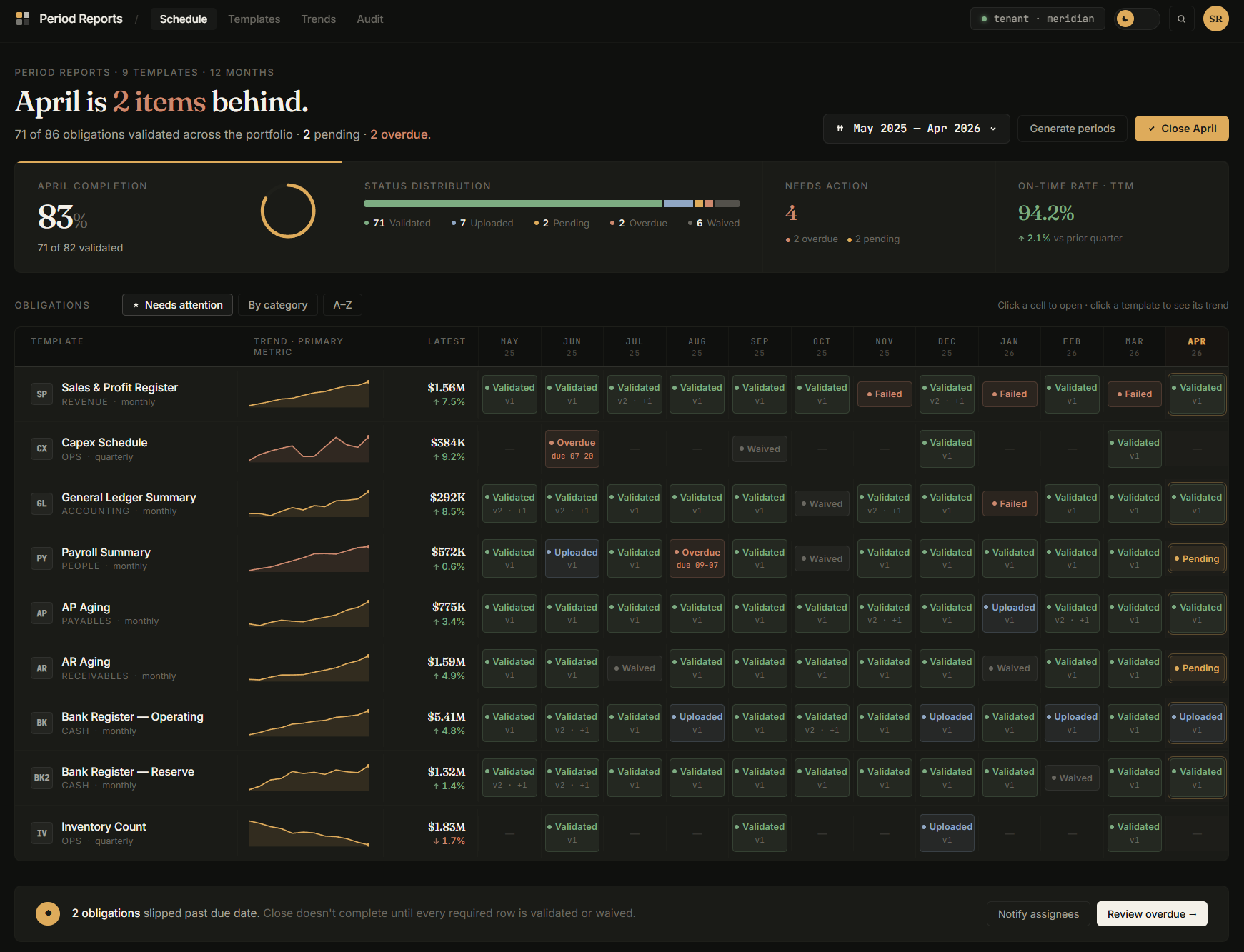
● Period Reports Period Reports command center — April is 2 items behind, 83% complete, 94.2% on-time rate, obligations grid with 12-period sparklines
The operational steering surface

Period Reports — the reports you already run, turned into a system of record.

Every recurring report your team produces — financial or operational — turned into a validated system of record with obligations, trending, and dashboards built for the data inside. On‑time delivery. Quote win rates. Sales and profit. AR aging. Bank registers. If you're exporting it, Coherence can track it.

i. Trend

Every template knows what matters in its data — totals, KPIs, composition breakdowns — and extracts those metrics automatically. The dashboard is live from your first upload, with a 12‑period sparkline on every row.

ii. Signal

Obligations tracked with due dates and assignees. You see what's missing before it blocks the close — not after. No more chasing files. No more "did you send me your AR aging?" emails.

iii. Steer

Click a cell to open the upload. Click a template to see its trend. One screen, every obligation, every period — with version history on every file and audit trails on every validation.

Capabilities below
The platform underneath

A full accounting and operations system, ready when you are.

When an entity is ready to move its day‑to‑day operation onto Coherence, it gets the complete platform — not a stripped‑down multi‑entity module, not a reporting layer pretending to be an ERP, but a purpose‑built accounting and operations system with the depth real finance and ops teams need.

Everything below is available when an entity runs natively. Most teams turn on what they need and leave the rest alone until later. The platform scales with you, and the Portfolio view updates in real time as entities flip to native.

Capability 01

Accounting.

The core that makes everything else real.

Ac
01.01

General ledger, chart of accounts, and period close.

A real double‑entry ledger with fiscal‑year flexibility, multi‑currency support, and proper period‑close mechanics. Each company keeps its own chart of accounts — no forced alignment across entities.

01.02

Journal entries and financial statements.

Full manual and automated journal entry workflows with audit trails on every post. Balance Sheet, Income Statement, Trial Balance, and Cash Flow Statement generate at query time from posted transactions — never from caches or nightly syncs.

01.03

Multi‑company accounting, not multi‑company reporting.

Combined views are live queries across entities, not ETL jobs. A vendor invoice posted in one entity reflects in the combined Balance Sheet in the same transaction. No synchronization logic, no reconciliation layer, no stale numbers.

01.04

Honest numbers by design.

Every ratio and aggregation is documented in an in‑product guide. When a metric can't be computed, the UI renders a dash rather than fabricating a value.

Capability 02

Customers.

Everything from first quote to final collection.

Cs
02.01

Customer quotes and price books.

Quote customers with versioned price books per customer or segment. Quotes convert to orders and invoices without rekeying.

02.02

Sales orders, invoicing, and cash sales.

Full order‑to‑invoice workflow with line‑level discounts, tax calculations, and ship‑to / bill‑to handling. AR Invoices and Cash Sales are first‑class transaction types with proper ledger posting.

02.03

AR aging and collections contact log.

Aging reports with click‑to‑drill from summary to source document. An embedded contact log tracks every collection call, email, and follow‑up against the customer record — with reminder dates and team‑wide visibility.

02.04

Projects and project cost tracking.

Budget vs. actual tracking at the project level, with revenue and cost captured as transactions post.

Capability 03

Vendors.

Everything from first RFQ to final payment.

Vn
03.01

Vendor RFQs and price books.

Request quotes from vendors with structured response tracking. Maintain vendor‑specific price books for purchasing.

03.02

Purchase orders and vendor invoices.

Full purchase‑to‑pay workflow with three‑way matching, receipt tracking, and AP posting.

03.03

Payment runs with NACHA and Positive Pay.

Pay hundreds of vendor invoices in minutes. Smart‑select actions group invoices by vendor and aging. A live scoreboard shows exactly how many checks will print and how many NACHA batches will be created. Structural duplicate‑payment prevention means the same invoice can't be on two active payment runs.

03.04

Flexible payees.

Pay vendors, employees, board members, or one‑time recipients without forcing everyone into the AP pipeline. Payees and vendors coexist as first‑class entities, with an optional link when the same party exists in both contexts.

03.05

Expense management.

Expense entry with approval routing and reimbursement via the same payment run infrastructure.

03.06

AP aging and contact log.

AP aging with drill‑down and an embedded contact log for vendor relationship management.

Capability 04

Inventory.

Items, BOMs, and what's actually in the warehouse.

In
04.01

Item master with classifications.

Products, services, and charges as distinct subsidiary ledger types. Classifications drive financial statement placement and sales analysis.

04.02

Bills of Materials and work orders.

Define BOMs for manufactured items and generate work orders that consume components and produce finished goods. Work‑in‑progress tracked at the ledger level.

04.03

Inventory movements and period balances.

Every movement posts to the ledger with proper costing. Period balances computed transactionally — never stale relative to the ledger.

04.04

Lot tracking and traceability.

Full lot‑level tracking with transaction history. Expand any lot to see exactly where it came from and where it went. Quarantine a lot and instantly see which customer orders are affected.

Capability 05

Operations.

One screen for the warehouse.

Op
05.01

Unified warehouse hub.

Fulfillment, receiving, lot tracking, and issue management in a single dark‑themed operator interface. One‑click quick paths for simple orders. Guided detail paths for lot‑tracked, inspected, or hazmat items.

05.02

Fulfillment and receiving worklists.

Every outbound and inbound order in one list, ranked by priority. On‑time delivery and on‑time receiving percentages visible as persistent banners with 12‑month trends.

05.03

Warehouse location management.

Multi‑location inventory with transfers and per‑location balances.

05.04

Ops issues worklist for office staff.

When the warehouse flags a problem — short shipment, damaged goods, wrong item — it flows to a dedicated office worklist for purchasing agents and customer service reps. Photos attached on the warehouse side are visible on the office side. Resolution updates back‑propagate to the source transaction.

05.05

Barcode and QR scanning.

Scan to verify against specific orders, not just to look up an item.

Capability 06

Banking.

Deposits, disbursements, and reconciliation that matches what's on your statement.

Bk
06.01

Accounts, deposits, and disbursements.

Bank accounts, trust accounts, and credit cards with vocabulary that matches the statement in front of you — deposits and withdrawals for bank accounts, charges and payments for credit cards.

06.02

Automatic bank reconciliation.

OFX, QFX, and CSV bank file import with saved column mappings per account. Three‑tier auto‑matching — exact amount plus date proximity plus check number correlation — scores every bank line against uncleared ledger transactions. Review matches in side‑by‑side view and accept individually or in bulk.

06.03

Chain‑linked statements.

Each reconciliation statement is linked to the prior one. Beginning balance auto‑populates from the last finalized statement and locks, preventing the most common reconciliation mistake: starting from the wrong number.

06.04

Finalization snapshots.

Finalize a reconciliation and the proof is immutable — book balances, cleared totals, outstanding items, computed difference all frozen at the moment of finalization. Auditors review exactly what was verified.

06.05

Outstanding items aging.

Dedicated aging report for uncleared items with severity buckets. An early warning system for stale checks and missing deposits.

Capability 07 · Covered above

Portfolio — the financial steering surface.

Covered in detail above. Briefly: the financial steering surface for everyone running or overseeing more than one company — nine metrics, lens‑based analysis, signal chips, full drill from portfolio to transaction.

transaction.

Back to Portfolio
Capability 08 · Covered above

Period Reports — the operational steering surface.

Covered in detail above. Briefly: the operational steering surface for every recurring report your team produces — financial or operational — with obligation tracking, automatic trending, and dashboards built for the data inside.

Back to Period Reports
Capability 09

Settings &
Platform.

The plumbing that makes the rest trustworthy.

Se
09.01

Users, roles, and permissions.

Granular role‑based access at every surface. Tenant‑isolated multi‑tenancy means a user in one organization physically cannot query another organization's data.

09.02

Personal Launchpad.

Each user builds their own home page — pinned Coherence pages, external links, named sections — organized the way they actually work. A CFO's Launchpad looks nothing like a warehouse lead's.

09.03

Audit logging.

Every lifecycle action on every transaction is logged: creation, changes, post, finalization, void. Filterable by action, user, and date range.

09.04

Concurrency and data integrity.

Optimistic concurrency with row‑versioning on every update. Two users editing the same record no longer means the last save wins — conflicts surface cleanly with recovery paths.

09.05

Portfolio sharing.

Explicit consent mechanism for letting parent organizations see participating entities' financials. Revocable at any time by the sharing organization. Row‑level tenant isolation with cross‑tenant query authorization means portfolio visibility is a capability, not a data merge.

Turn on what you need

Most teams start with Portfolio or Period Reports
and add the rest when they're ready.

The platform scales with you. An entity can upload trial balances today and run native accounting next quarter, and the Portfolio view works identically either way. Turn on what you need. Leave the rest until you want it.